Build a Website from a Single Prompt: Bolt, Lovable, Framer, and Buddy Compared
Every AI website builder makes the same promise: describe what you want, get a live site. I've been testing four of them — Bolt.new, Lovable, Framer AI, and Buddy with Claude Code. They all generate pages. Only one registers the domain, handles the CDN, and sets up analytics without you touching a browser. Here's where they actually differ.
What "single prompt" actually means
The benchmark I care about is this: I type one thing, and the result is a website with a real URL that someone other than me can visit. Not a preview. Not a sandbox. Not a localhost:3000 I have to babysit. A live site, on a domain, with traffic analytics running.
Most AI builders cover the creative part — layout, copy, components. The deployment part is where they stop and hand things back to you. That handoff is where side projects go to die. You get distracted configuring Netlify, forget the analytics snippet, and the whole thing rots in a tab.
So I'm grading each tool on the full chain:
- Generation — does it produce a working, reasonably attractive site from a plain-English description?
- Domain — can it claim a real URL without you going to a separate registrar?
- Hosting — does it publish to a CDN, not just a preview environment?
- Analytics — does it wire up traffic tracking automatically?
- Code ownership — do you own the output, or is it locked to their platform?
| Tool | Generation | Domain | CDN Hosting | Analytics | Own the code |
|---|---|---|---|---|---|
| Bolt.new | ✓ Excellent | ~ Via Netlify | ~ Via Netlify | ✗ Manual | ✓ Yes |
| Lovable | ✓ Excellent | ~ Custom via settings | ✓ Built-in | ✗ Manual | ✓ GitHub export |
| Framer AI | ✓ Design-first | ~ Custom on paid | ✓ Framer CDN | ~ Basic only | ✗ Platform lock-in |
| Buddy + Claude | ✓ Excellent | ✓ In-session, free | ✓ Buddy edge CDN | ✓ Automatic | ✓ Plain files |
Bolt.new — Fast from idea to prototype
Bolt is StackBlitz's AI-powered app generator and it is genuinely fast. Type "a landing page for a coffee subscription service, minimal design, dark header, three pricing tiers" and within 90 seconds you have working HTML, a React component structure, and a preview running in the browser. The generated code is clean enough that you'd commit it.
Where it stops short: deployment. Bolt can publish to Netlify with a click, but that's a separate sign-up flow, a separate dashboard, and a domain from Netlify's subdomain namespace (your-site.netlify.app). You can attach a custom domain, but that's you opening another tab, configuring DNS, waiting for propagation. Analytics is entirely on you. The handoff point is right at the moment of publication — which is exactly the part where friction kills momentum.
Best for: Developers who want to prototype fast and will handle the deploy themselves. The generated code quality is high and it's a great starting point if your final stack is Vercel, Netlify, or Cloudflare Pages.
Lovable — The SaaS scaffolding option
Lovable (formerly GPT Engineer) is oriented toward building full SaaS products, not just marketing pages. Its Supabase integration means you can describe a CRUD app with user auth and get something functional. It publishes automatically to Lovable's hosting, which is a CDN-backed environment — you get a yourproject.lovable.app URL out of the box.
The built-in hosting is a meaningful step up from Bolt. Custom domains are available but require you to configure DNS records manually — no in-tool registration. There's no analytics wiring. GitHub export gives you code ownership, which is the right call, though the React/TypeScript scaffold is heavier than you need for a simple site.
Best for: Building small SaaS products or internal tools where you need a backend and don't mind the React overhead. Not ideal if you just want a fast, lightweight marketing site or landing page.
Framer AI — The design-forward choice
Framer started as a design tool and its AI feature inherits that DNA. You describe a website and get something that looks expensive — refined typography, animations that don't feel cheap, layout that wouldn't embarrass a real agency. For marketing teams who care about aesthetics and don't have a developer, Framer AI is a strong option.
It publishes to Framer's hosting immediately, with a yoursite.framer.website subdomain on the free tier. Custom domains require a paid plan and you configure them through Framer's dashboard — no programmatic option. The real limitation is lock-in: Framer sites aren't portable. The output is a Framer project, not HTML files you own. If you outgrow the platform, migration is painful.
Best for: Design-first landing pages and portfolio sites where aesthetics matter more than code ownership or infrastructure control.
Buddy + Claude Code — The only one that finishes the job
Buddy is different from the others because the AI isn't a feature bolted onto a website builder — it's Claude Code operating a CLI (bdy) that has full access to Buddy's infrastructure. Domain registration, artifact publishing, CDN routing, and analytics setup are all terminal commands. Claude knows how they work and can chain them without intervention.
This matters because the step most tools skip — "now go get a domain and point it somewhere" — is just another command here. And because free domains are actually free (not trial free, not subdomain free), the AI can register one and move on without hitting a payment wall or asking you to log in somewhere.
Here's what the flow looks like in a real session. A single prompt — "build me a coffee subscription landing page, clean minimal design, register a free domain, and deploy it" — and Claude starts working through the chain:
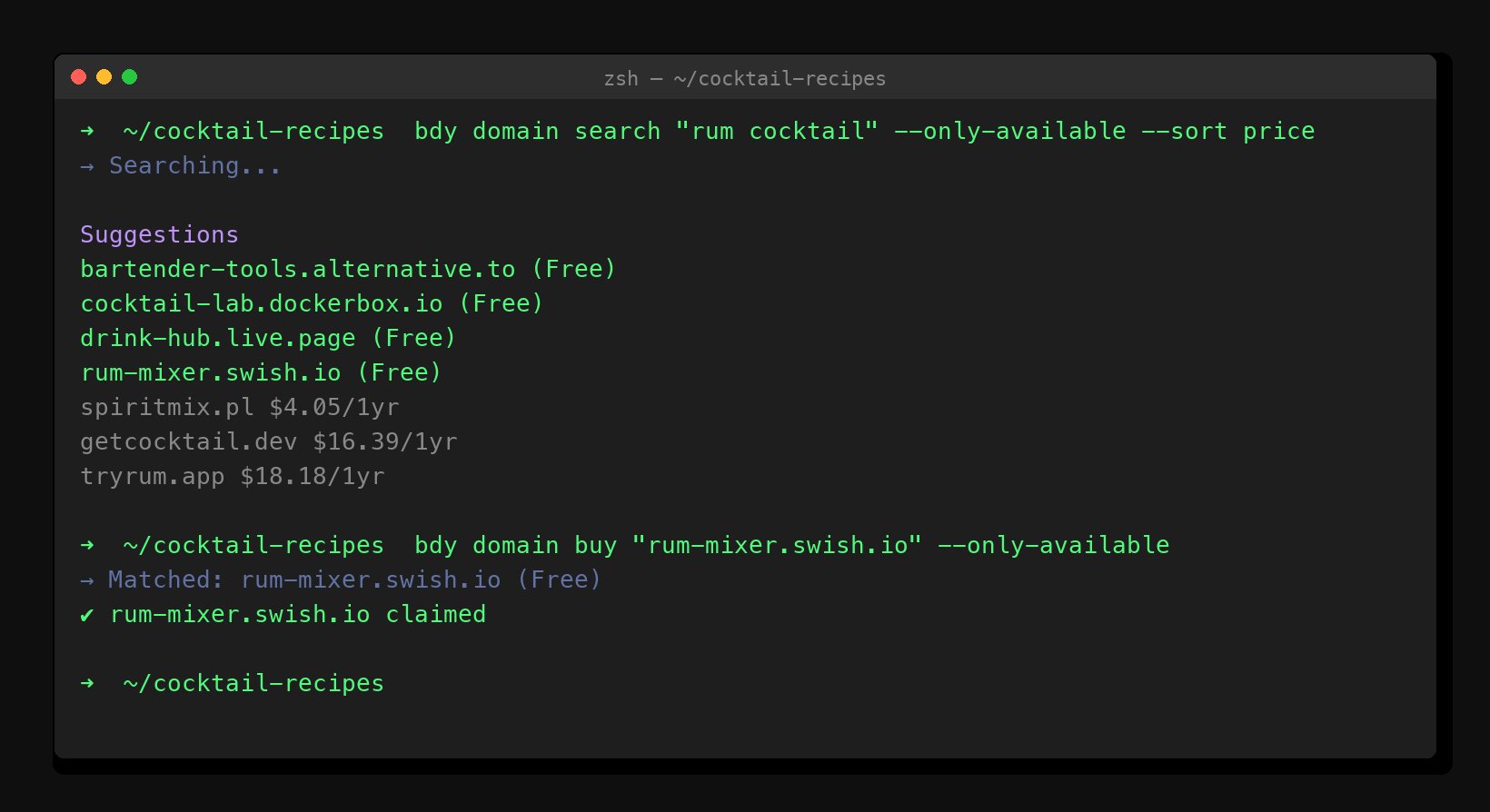
Once the domain is claimed, Claude generates the site source — a complete index.html with inline CSS, responsive layout, and whatever content was described. Then it publishes:
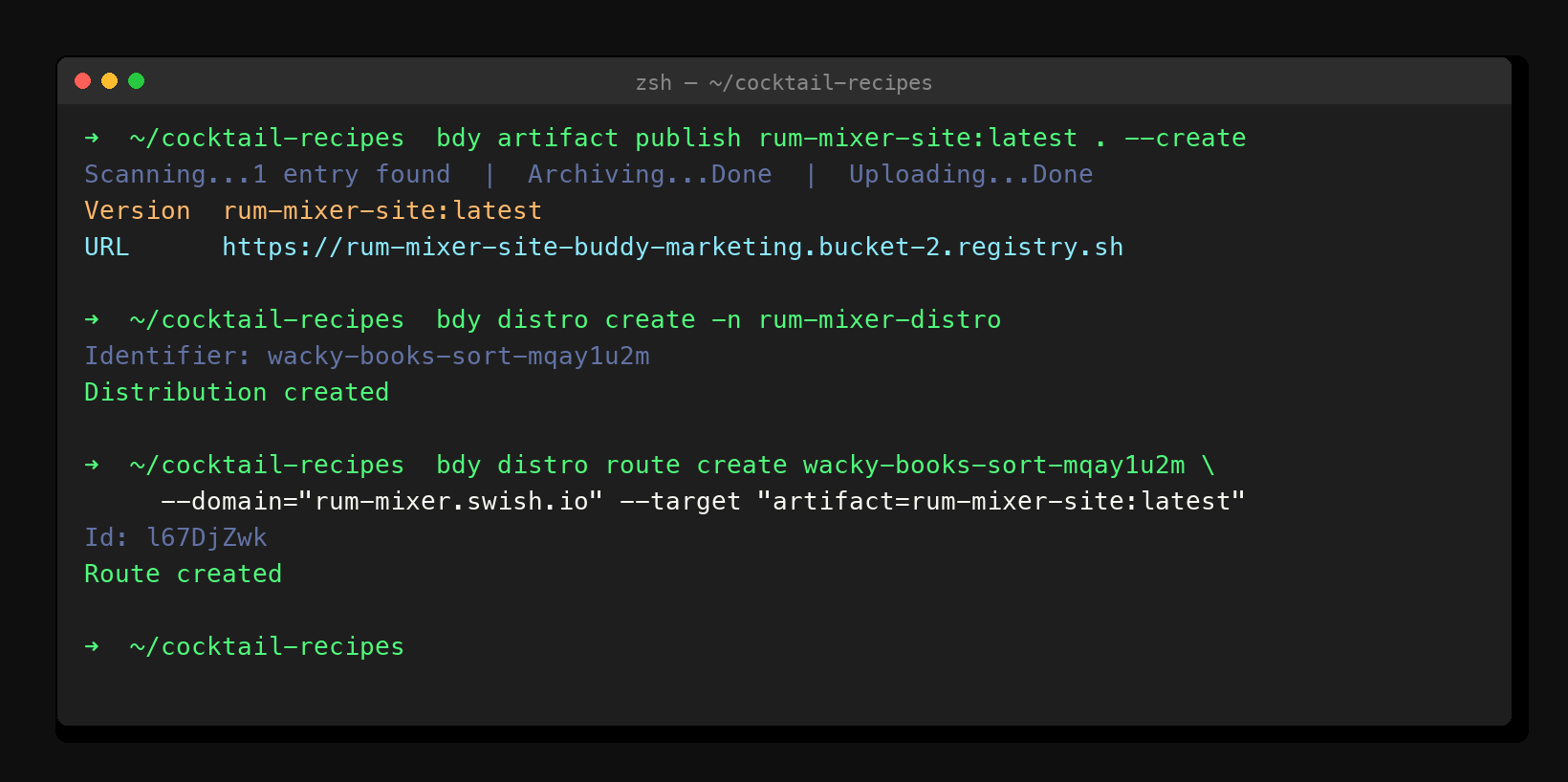
After the deploy, Claude runs the analytics pipeline — bdy pipeline run start add-analitics-website — reads the tracking snippet from the pipeline output, embeds it in the HTML <head>, and republishes. Analytics start working immediately, no Plausible account to create, no Google Tag Manager to configure.
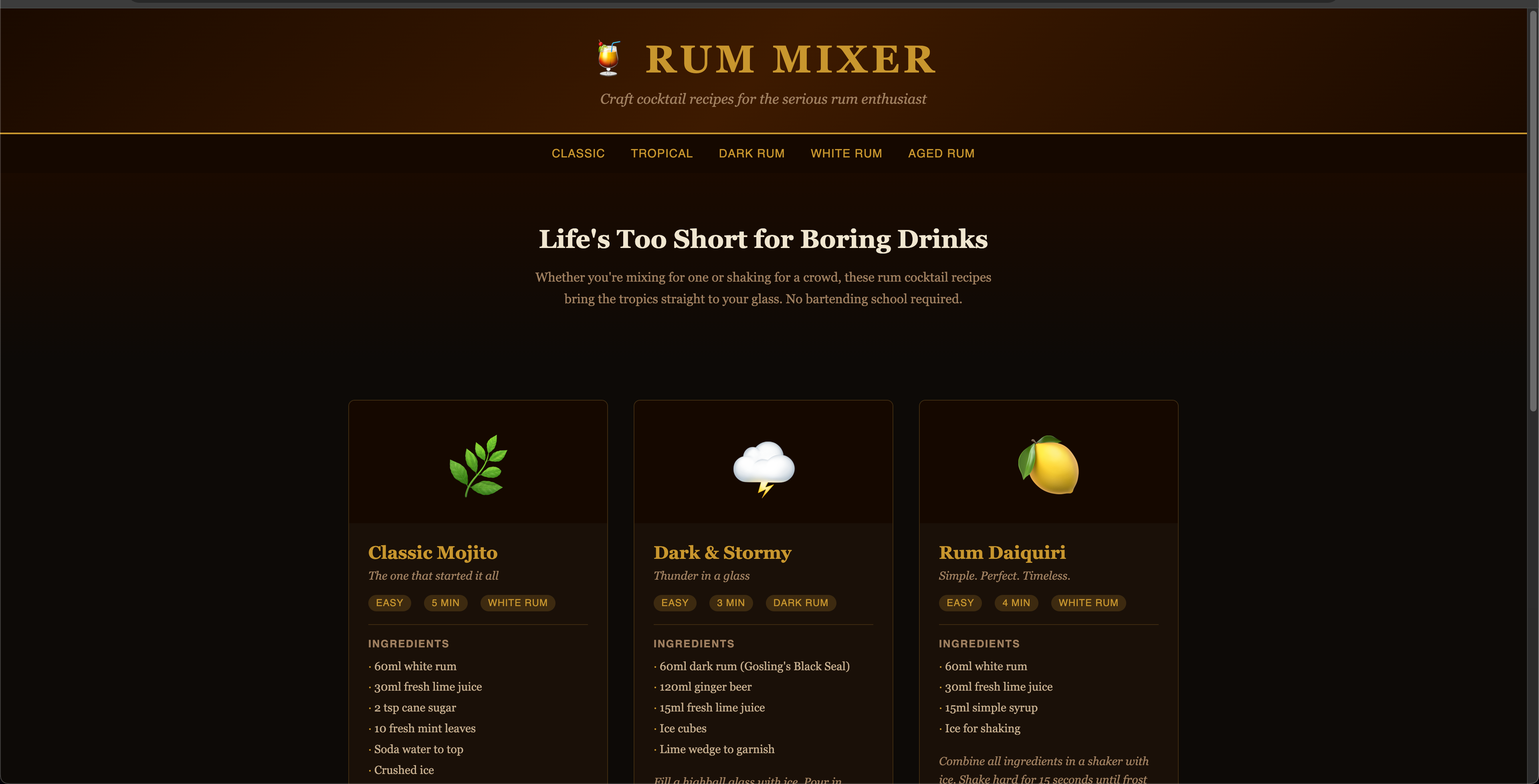
What Buddy can't do (yet)
It's not a WYSIWYG editor. You're not dragging components around a canvas. If you want pixel-level visual control over the generated design, Framer or a Figma-to-code workflow is a better starting point.
The generated sites are clean and functional but they're not going to win design awards without iteration. If aesthetics are the primary constraint, Framer AI will produce something more polished from prompt one. Buddy wins on infrastructure completeness, not visual fidelity.
There's also a learning curve on the tooling. Claude Code and the bdy CLI are terminal-native. Non-developers who are allergic to the command line will have an easier time with Bolt's browser UI or Framer's canvas.
The gap nobody talks about
Every AI website builder has a hidden handoff point — a moment where the AI's job ends and yours begins. For Bolt, it's "now go configure Netlify." For Lovable, it's "now point your DNS." For Framer, it's "now decide whether to pay for a custom domain."
The handoff is where side projects stall. Not because you can't do those tasks — you can — but because friction compounds. Each tool switch is an opportunity to lose the thread. Each dashboard opened is a context you have to reload later.
What makes Buddy's approach different is that the handoff never happens. The session that generated the site is the same session that registered the domain, published the artifact, configured the route, and enabled analytics. When Claude says it's done, it's actually done. There's a config.json in the project root recording exactly what was provisioned and where — so if you come back six months later, you don't have to dig through dashboards to figure out what's deployed.
Which one should you use
Use Bolt.new if you're a developer who wants fast, clean generated code and will manage hosting yourself. The output quality is excellent and the prototype-to-production path is well-worn.
Use Lovable if you're building a small SaaS product that needs a backend and user auth alongside the frontend. Its React/Supabase scaffolding saves real time for that use case.
Use Framer AI if you're a designer or marketer who wants a beautiful site without touching code, and you're comfortable with the platform's hosting and pricing long-term.
Use Buddy + Claude Code if you want to type a sentence and walk away with a live site on a real domain — no tab-switching, no DNS config, no post-session cleanup. It's the only option in this list where the AI genuinely finishes the job.